Ecommerce Peak Season Readiness: Is Your Storefront Ready for Black Friday 2026?
Black Friday is approaching. Retailers are preparing for the rush, but recent cyberattacks are a reminder that peak-season readiness goes well beyond promotions and stock. Here are eight checks to help protect your ecommerce performance, checkout and revenue.
Written by
Bhumeshri Chhatani
Published on
Nov 2026
Ai Summary
Strengthen security before peak trading: Review WAF rules, bot protection, rate limits and API security to protect against malicious traffic, fraud and potential cyberattacks.
Test performance and checkout under pressure: Simulate realistic traffic surges, test the full purchasing journey and monitor Core Web Vitals to ensure customers can complete purchases during peak demand.
Validate platforms and integrations: Check platform-specific settings across SFCC, Shopify Plus and headless commerce, alongside payment gateways, inventory, tax and fraud services.
Monitor revenue-critical metrics and prepare for incidents: Track checkout completion, payment failures, errors, bot activity and API performance, with clear escalation procedures, recovery plans and 24/7 support.
Maintain readiness throughout Christmas trading: Continue monitoring security, mobile performance, stock availability and payment processing beyond Black Friday and Cyber Monday, through December's peak sales period.
This summary was created with AI and reviewed by an editor
£3.8 billion. That's how much UK shoppers spent online during Cyber Weekend 2025, according to Adobe. Black Friday alone generated £1.16 billion.
But the opportunity comes with a growing risk.
New Accertify research, published in September 2026, analysed 576 million transactions across five Cyber Week seasons. It found that 14% of attempted fraud occurred during an overnight window accounting for just 8% of transaction volume.
And October brought another warning. Cyber incidents involving high profile retailers such as ASOS highlight how quickly disruption to connected retail systems can affect businesses before peak trading even begins.
With Black Friday on 27 November 2026, retailers have less than four weeks to check their defences, test checkout performance and prepare for the unexpected.
Your Eight-Point Ecommerce BFCM Readiness Checklist
Preparing an ecommerce site for peak season means testing the complete purchasing journey, protecting customer-facing systems, checking third-party dependencies and ensuring someone can respond when problems arise.
1. Protect Your Storefront Before Attackers Find a Gap
Malicious bots don't stop at your homepage. They target logins, promotions, inventory, checkout and commerce APIs.
Review Web Application Firewall (WAF) rules, bot mitigation, rate limits and suspicious traffic patterns.
For Salesforce Commerce Cloud (SFCC), include OCAPI and SCAPI endpoints. Test security rules to ensure genuine shoppers aren't accidentally blocked.
TCTG's Managed WAF for SFCC provides real-time threat visibility, automated IP blocking and 24/7 response. Our industry leading solution is helping global retailers save millions in lost revenue.
2. Test What Happens When Traffic Surges
A successful homepage load test doesn't prove checkout will survive Black Friday.
Simulate realistic customer journeys, including product search, promotions, add-to-cart and payment authorisation.
Test sudden traffic spikes as well as sustained demand. Monitor response times, error rates and failed transactions.
The important measure isn't how many visitors your site accepts. It's how many can still complete their purchase.
3. Know Your Storefront's Performance Limits
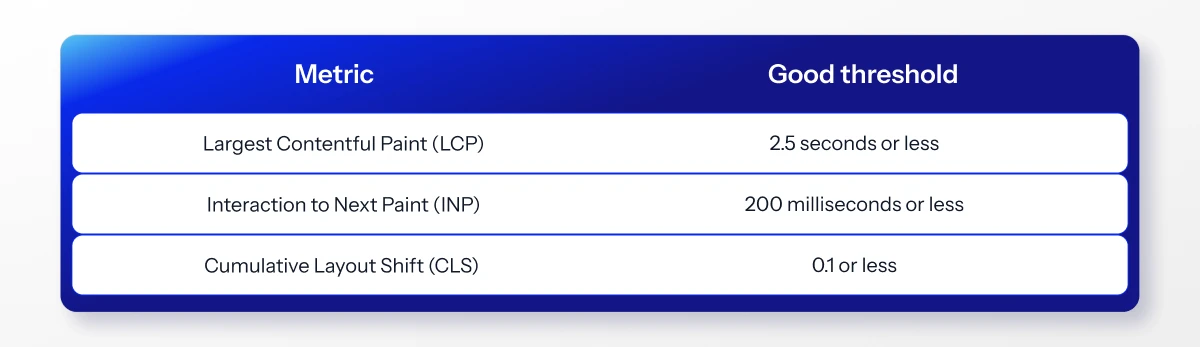
Google recommends the following Core Web Vitals thresholds:
Measure real-user performance at the 75th percentile. Use laboratory testing, including Total Blocking Time (TBT), to investigate bottlenecks. Pay particular attention to mobile product pages and checkout.
4. Check Your Platform's Peak-Season Settings
Salesforce Commerce Cloud: Review Business Manager jobs, search indexing, caching, replication schedules and eCDN security. Check relevant API protections before code freeze.